Showing posts with label Samsung. Show all posts

Monday, November 18, 2013

The Next Gen of the 10.1" Phablets

Here we go for the new Ultimate and "SUPER-Phablet" alike Computers,

THE SAMSUNG GALAXY NOTE 10.1" 2014 Edition [MODEL NAME: SM-P605, LTE model]
and i would thanks to my friends, Isaac Tan for the permissions to me to introduce and wrote this awesomeness tablets as well  laugh.gif 

cool.gifHere is the Specifications cool.gif

DESIGN

  • Device type:
    • Tablet
  • Phone functionality:
    • Yes
  • OS:
    • PopupAndroid (4.3) TouchWiz UI
  • Dimensions:
    • 9.57 x 6.75 x 0.31 inches (243.1 x 171.4 x 7.9 mm)
  • Weight:
    • 19.29 oz (547 g)
      the average is 17.2 oz (490 g)

DISPLAYPopup

  • Physical size:
    • 10.1 inches
  • Resolution:
    • 2560 x 1600 pixels
  • Pixel density:
    • 299 ppi
  • Technology:
    • Super Clear LCD
  • Colors:
    • 16 777 216
  • Touchscreen:
      • Multi-touch
  • Features:
    • Light sensor

CAMERA

  • Camera:
      • Popup8 megapixels
    • Flash:
      • LED
    • Features:
      • PopupBack-illuminated sensor (BSI), Auto focus, Face detection, Smile detection, Exposure compensation, ISO control, White balance presets, Burst mode, Digital zoom, Geo tagging, Panorama, Scenes, Self-timer
  • Camcorder:
      • 1920x1080 (1080p HD)
  • Front-facing camera:
      • 2 megapixels

HARDWARE

  • System chip:
    • Qualcomm Snapdragon 800 MSM8974
  • Processor:
    • Quad core, 2300 MHz, Krait 400
  • Graphics processor:
      • Adreno 330
  • System memory:
    • 3072 MB RAM
  • Built-in storage:
    • 16 GB
  • Storage expansion:
    • microSD, microSDHC, microSDXC up to 64 GB

BATTERY

  • Talk time (3G):
    • 43.00 hours
      the average is 36 h (2140 min)
  • Capacity:
    • 8220 mAh
  • Not user replaceable:
    • Yes

MULTIMEDIAPopup

  • Music player:
    • Filter by:
      • Album, Artist, Playlists
    • Features:
      • Album art cover, Background playback
  • Speakers:
    • Stereo speakers
  • YouTube player:
    • Yes

INTERNET BROWSING

  • Built-in online services support:
    • Facebook, YouTube (upload), Picasa/Google+, Twitter

TECHNOLOGY

  • GSM:
    • 850, 900, 1800, 1900 MHz
  • UMTS:
    • 850, 900, 1900, 2100 MHz
  • FDD LTE:
    • 800 (band 18), 850 (band 5), 900 (band 8), 1800 (band 3), 2100 (band 1), 2600 (band 7) MHz
  • Data:
    • LTE Cat4 Downlink 150 Mbit/s, LTE Cat3/4 Uplink 50 Mbit/s, HSDPA+ (4G) 42.2 Mbit/s, HSUPA 5.76 Mbit/s, UMTS, EDGE, GPRS, EV-DO Rev.A
  • Micro SIM:
    • Yes
  • Positioning:
    • GPS, A-GPS, Glonass
  • Navigation:
    • Turn-by-turn navigation

cool2.gifAnd i start from the boxes cool2.gif
rolleyes.gif Soy Ink Printed boxes alike Samsung Galaxy S4 LTE boxes rolleyes.gif

wub.gif Here is it wub.gif

 Nice UI, TouchWiz revamped from Samsung Galaxy S4 
happy.gifHere is the Thickness... happy.gif

Here is the Sample UI from sites biggrin.gif
Nice apps drawer did it as well 

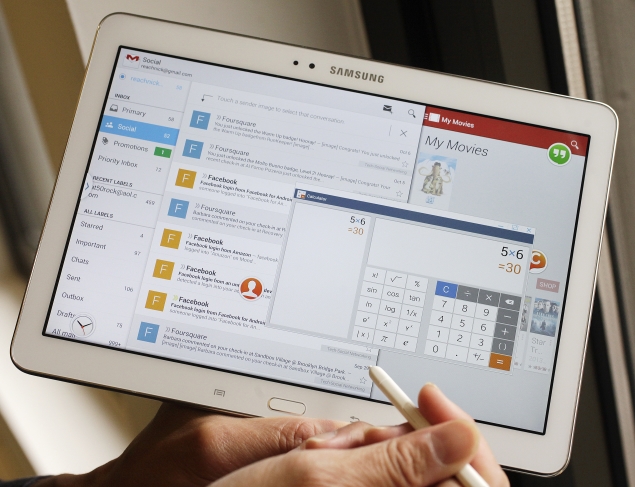
Multi Windows enabled 

Notification buttons can set up easily 
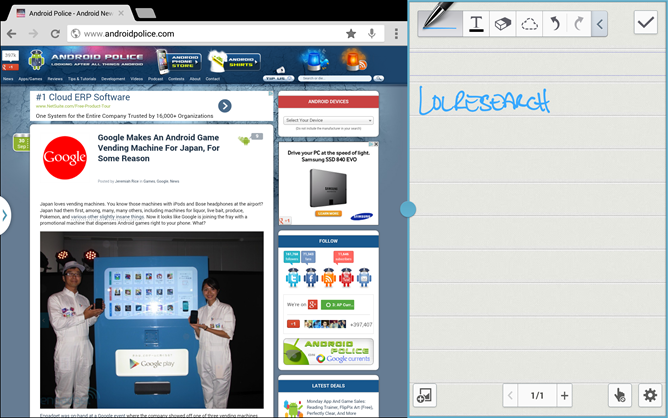
This is THE REAL GUN from GALAXY NOTE 3,
rclxms.gifcombo window aka Pen windows rclxms.gif
icon_idea.gifNew S-Pen functions, which is 
comes from Samsung Galaxy Note 3


Sample Video was taken From famous Computing website, Engadget


Sample Camera from the sites 

No Benchmark was added cause personally to avoid the Fanboyism to flaming the blogs biggrin.gif

Pros:
New S-Pen functions , 
1st Qualcomm SnapDragon S800 Processors on the gigantic Phablets[Phone Tablet, u may found it at Oxford Online Dictionary], 
Camera snapping improved from Last year model of the G.Note 10.1" 2012 edition
SD-cards for expandable storage ready
Faux-like design at the rear
SIM cards ready 
8200 mAh NiCad battery ready 

Cons:
A bit of Plastic gimmicks 
doh.gif
Less Accessories to get it for this [CASES]

Verdict: 98% [MY BEST choice]


Sunday, September 8, 2013

The First Impression about Samsung Galaxy Note 3

Well, this is my first impressions on this devices...
and is officially was launched at IFA Berlin 2013 and they highlighted new model, 
N-9000, N9002 and N9005
N9000-3G models w Samsung Exynos 4+4 processorsN9002-3G models w dual sim 
N9005-4G models w Qualcomm SnapDragon S800 A7x ARM processors 

Wow, is expected from Faceook leaked pictures

and 
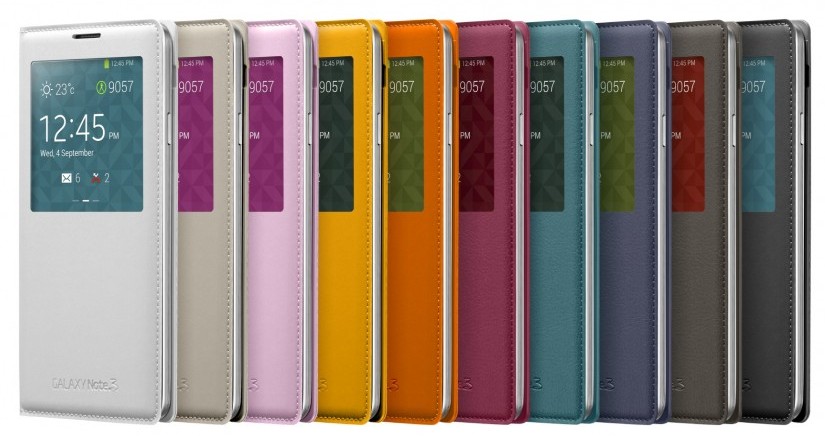
looks on leather skins on the cover..

New Customized S-View Covers 

and the specs 

  • Android 4.3 with latest version of Touchwiz
  • 5.7-inch Super Amoled display, 1920x1080 resolution
  • 3GB of RAM
  • 2.3GHz Snapdragon 800 CPU in LTE variant w Adreno 330 GPU
  • 1.9GHz Exynos Octa Core CPU in 3G variant w Mali T626 GPU
  • 13MP rear camera with LED Flash
  • 2MP front facing camera with BSI sensor and smart stabilization
  • Full HD 1080p 60fps video recording (4K recording available in some models)
  • NFC
  • Bluetooth LE
  • 32GB/64GB on-board storage, expandable via microSD card (up to 64GB card supported)
  • 3200mAh removable battery
  • microSIM card
  • S Pen with optimized features - Air Command: Action Memo, Scrapbook, Screen Write, S Finder, Pen Window, S Note, Multi Window, new Easy Clip, Direct Pen Input


well, my 1st impressions on this devices is
1.1st Phone runs on USB 3.0 w Micro-USB [B]
2.4K ULTRA HD Video Captures 
3.runs on 3GB LPDDR2 RAM on both models 
4.1st Phablet [Phone-Tablet] that runs w LTE-Advance 
5.1st NON-NEXUS DEVICES w Android 4.3 Jelly Beans 
6.New S-Pen functions 

Here is the link for well-known famous gadgets sites..

1.The Samsung Galaxy Note 3 is the most interesting smartphone released this year. Here’s why.-Mobile Syrups


4.samsung_ifa_2013-reviews on G.Note 3 , By GSMarena

and here is the official videos :)


Tuesday, July 2, 2013

How-To-Flash back your Bricked Samsung Galaxy Series to original System

Flashed custom rom such as Android Open Kang Project {AOKP} n etc w/o inproper steps and
after that flashed, your phone still strucks on logo? sad.gifsad.gif

okay, well i'll teach how-to Flash Back the Original aka. Stock ROM (READ ONLY MEMORY) system  for wide variant of Samsung Galaxy Series

Tools
Samsung Galaxy series, Odin Flash tools [they got 2 versions at odin, V 1.86 and v.3.06 or etc] and Sam Mobile PDA files [all of them contains .tar so YOU just download it]

1.Turn off your devices and make sure your is PRE-INSTALLED the Samsung ADB Devices and drivers!
2.Volume Down + home Button + Power Button
3.they will ask about...[meh.. ignore it] and press volume up
4.You'll saw a Greenies Droid was written as ODIN MODES
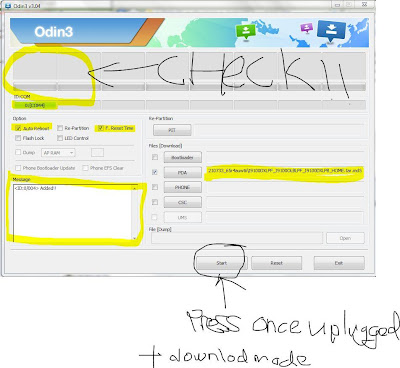
5.GO open Odin flash tools for Samsungs and mount the files like [phone model like GT-i9100{Galaxy S2}-PDA-CSC-MODEM] and mount it at PDA
6.And CHECK Status at the ID:COM , the pictures that i've shown below AND DO NOT TICK EFS and JUST LEFT IT AT THERE!
Here, The code steps added when u press starts button
boot.img- NAND - etc till successful  

5.Once u done your flashing ,unplug your USB connector and left it to install the apps on your phone...
6.Done, happy users...blush.gifblush.gif

Oh yeah, For those who using Galaxy S4, Note 3, S3 n Note 2 that contained the Knox Bootloader...
PLEASE USE THE LATEST ODIN(V 3.09) EG. MJ5/MJ7 Bootloaders..
and other's, you may refer XDA-developers link :D

Legends.
.md5- a code files that contains the codes
.tar - a files that contains full OS on Samsung Phones